

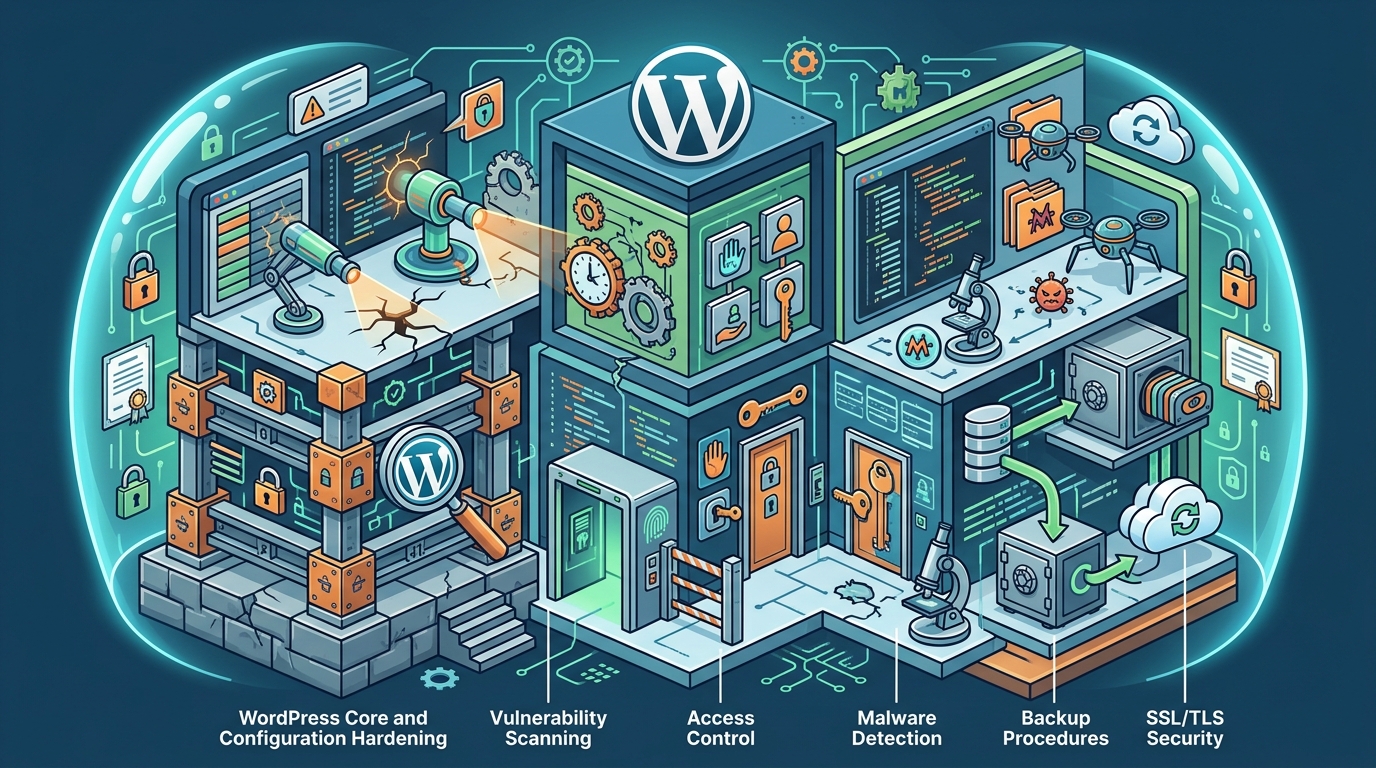
A WordPress security audit is a structured assessment of your site's configuration, code, and infrastructure to identify vulnerabilities before attackers exploit them. This guide covers the six critical pillars of a professional audit: configuration hardening, vulnerability scanning, access control, malware detection, backup procedures, and SSL/TLS security. Računalničar, Sebastijan Bandur s.p. provides these services in Maribor, Slovenia, combining traditional security tools with AI-native testing workflows.
WordPress Configuration Hardening
Core File Protection
Auditors verify that critical files such as wp-config.php and .htaccess are protected from direct web access. The wp-config.php file contains database credentials and security keys. If this file is accessible via the web, attackers can steal your database password. The audit checks for proper file permissions and server-level restrictions that block direct HTTP requests to these files. For additional details, review the Storitve Ra unalni ar.
Disabling File Editing and XML-RPC
Security Headers and CORS
Vulnerability Scanning
Vulnerability scanning is the automated or semi-automated process of identifying known security weaknesses in a website's code, plugins, and themes. It is a continuous process that should be performed regularly, not just once. A vulnerability scan is a systematic check against a database of known exploits and misconfigurations. For additional details, review the AI integracije in MCP.
OWASP Top 10 Assessment
Professional audits align with the OWASP Top 10, a standard document that describes the most critical security risks to web applications. For WordPress sites, the most common risks include broken access control, cryptographic failures, and injection attacks. The audit tests for SQL injection, cross-site scripting (XSS), and remote code execution (RCE) vulnerabilities in both core files and third-party extensions. For additional details, review the Ra unalni ar Sebastijan.
Plugin and Theme Integrity
API and Endpoint Security
Modern WordPress sites often expose REST API endpoints. These endpoints can be abused if not properly secured. The audit reviews the configuration of the REST API to ensure that sensitive data is not exposed to unauthenticated users. It also checks for rate limiting and authentication requirements on all public endpoints.
User Access Control
User access control is the mechanism that determines who can view and modify content within the WordPress system. It is a critical component of any security audit because weak access controls are a primary vector for compromise. A robust access control system is one that enforces the principle of least privilege, granting users only the permissions they need to perform their jobs.
Role and Permission Review
Auditors review all user accounts and their assigned roles. They verify that no unnecessary administrator accounts exist and that permissions are appropriately scoped. For example, an editor should not have the ability to install plugins or modify theme files. The audit identifies any accounts with excessive privileges and recommends their demotion or deletion.
Multi-Factor Authentication (MFA)
Multi-factor authentication is a security process that requires users to provide two or more verification factors to gain access to a resource. For WordPress, MFA adds a second layer of protection beyond the password. The audit checks whether MFA is enforced for all administrative accounts. It also verifies that the MFA method is secure, such as using authenticator apps or hardware keys rather than SMS, which is susceptible to SIM swapping.
Session Management
Session management controls how user sessions are created, maintained, and terminated. Auditors check for secure session handling, including the use of secure cookies, session timeout policies, and concurrent session limits. Weak session management can lead to session hijacking, where an attacker steals a valid session token to impersonate a user.
Malware Detection
Malware detection is the process of identifying malicious code, scripts, or files that have been injected into a WordPress site. It is a reactive measure that complements preventive controls. A malware detection system is a set of tools and processes designed to find and remove unauthorized code from a web server.
File Integrity Monitoring
File integrity monitoring (FIM) compares the current state of files on the server against a known good baseline. If a file has been modified without authorization, the system flags it as a potential malware infection. Auditors verify that FIM is in place and that alerts are being monitored. This is particularly important for core WordPress files, themes, and plugins.
Web Shell and Backdoor Detection
Web shells are malicious scripts that allow attackers to execute arbitrary commands on the server. They are often hidden in seemingly legitimate files. Auditors use specialized tools to scan for known web shell signatures and suspicious code patterns. This includes checking for obfuscated code, base64-encoded strings, and unusual function calls.
Log Analysis
Log analysis involves reviewing server and application logs for signs of malicious activity. Auditors look for patterns such as repeated failed login attempts, unusual file access, or unexpected outbound connections. This helps identify ongoing attacks that may not be detected by signature-based malware scanners.
Backup Procedures
Backup procedures are the processes used to create and store copies of a website's data and files. They are a critical component of disaster recovery. A reliable backup system is one that allows a site to be restored to a known good state in the event of a compromise or data loss.
Backup Frequency and Scope
Backup Verification and Testing
A backup is only as good as its ability to be restored. Auditors verify that backup restoration has been tested. This involves performing a test restore to a staging environment and verifying that the site functions correctly. The audit also checks that backup files are encrypted and protected from unauthorized access.
Retention Policies
Retention policies define how long backups are kept. Auditors review these policies to ensure that they align with the organization's recovery objectives. For example, keeping daily backups for 30 days and weekly backups for 12 months provides a good balance between storage costs and recovery flexibility.
SSL/TLS Security
SSL/TLS security is the use of encryption protocols to secure data in transit between the user's browser and the web server. It is a fundamental requirement for any modern website. A secure SSL/TLS configuration is one that uses strong encryption algorithms, up-to-date protocol versions, and properly managed certificates.
Protocol and Cipher Suite Review
Certificate Management
Certificate management involves the issuance, renewal, and revocation of SSL/TLS certificates. Auditors check that certificates are valid, not expired, and issued by a trusted Certificate Authority (CA). They also verify that the certificate covers all relevant domains and subdomains. Automated renewal processes, such as those provided by Let's Encrypt, are recommended to prevent expiration.
HSTS and Certificate Pinning
HTTP Strict Transport Security (HSTS) is a mechanism that forces browsers to use HTTPS for all future requests to a domain. Auditors verify that HSTS is enabled and that the max-age is set appropriately. Certificate pinning, a more advanced technique, can also be reviewed to prevent man-in-the-middle attacks, though it requires careful management to avoid locking out users.
Comparison of Audit Components
| Component | Primary Goal | Key Tools/Methods | Frequency |
|---|---|---|---|
| Configuration Hardening | Reduce attack surface | File permissions, security headers | Quarterly |
| Vulnerability Scanning | Identify known weaknesses | OWASP Top 10, CVE databases | Monthly |
| User Access Control | Enforce least privilege | Role review, MFA | Quarterly |
| Malware Detection | Find injected code | File integrity, log analysis | Continuous |
| Backup Procedures | Ensure recoverability | Off-site storage, test restores | Monthly |
| SSL/TLS Security | Secure data in transit | Protocol review, certificate management | Quarterly |
Key Takeaways
- User access control must enforce the principle of least privilege and require multi-factor authentication for admins.
- Malware detection requires file integrity monitoring and log analysis to identify injected code and web shells.
- SSL/TLS security involves using modern protocols like TLS 1.3 and managing certificates to prevent expiration.
- A comprehensive audit combines all six components into a cohesive security strategy.
- Regular audits are essential to maintain security as the threat landscape evolves.
Frequently Asked Questions
How often should a WordPress security audit be performed?
A full security audit should be performed at least annually. However, vulnerability scanning and malware detection should be performed continuously or monthly. Configuration and access control reviews can be done quarterly.
What is the difference between a security audit and a penetration test?
A security audit is a broader assessment of configuration, code, and processes. A penetration test is a simulated attack that attempts to exploit vulnerabilities. A comprehensive audit often includes a penetration test as part of the vulnerability scanning phase.
Can I perform a security audit myself?
You can perform basic checks using plugins and online tools. However, a professional audit provides a deeper analysis, including code review and manual testing, which is difficult to replicate with automated tools alone.
What are the most common WordPress vulnerabilities?
The most common vulnerabilities include SQL injection, cross-site scripting (XSS), and broken access control. These are often found in outdated plugins and themes.
Is multi-factor authentication mandatory for WordPress?
While not technically mandatory, MFA is strongly recommended for all administrative accounts. It significantly reduces the risk of account compromise through password guessing or phishing.
How do I know if my WordPress site has been hacked?
Signs of a hack include unexpected changes to content, new admin accounts, redirects to malicious sites, and warnings from search engines. A malware detection scan can confirm the presence of injected code.
What is the role of SSL/TLS in a security audit?
SSL/TLS ensures that data transmitted between the user and the server is encrypted. The audit verifies that the configuration is secure and that certificates are valid and up to date.
How long does a WordPress security audit take?
Conclusion
A comprehensive WordPress security audit is not a one-time task but an ongoing process that requires attention to configuration, code, access, and infrastructure. By addressing the six pillars outlined in this guide, you can significantly reduce the risk of compromise and ensure the resilience of your digital presence. Računalničar, Sebastijan Bandur s.p. offers professional security testing and AI-native integration services in Maribor, Slovenia, helping organizations secure their WordPress sites with modern, effective methodologies. To begin your audit, contact our team for a security assessment.